NetSuite and DATEV, finally talking to each other. Fully automated accounting and payroll, built for German compliance.
Cloudmaven’s eUnify connector links NetSuite to DATEV natively, so accounting exports and payroll imports run without spreadsheets, manual re-keying, or year-end surprises. It’s the same finance-first approach we bring to every ERP engagement.

Why eUnify, in one paragraph
eUnify isn’t a third-party tool bolted onto NetSuite from the outside. It’s a native NetSuite application, built and maintained in-house by the same Cloudmaven team that configures your NetSuite finance architecture, not handed off to a separate integration vendor once the ERP project ends. Your accounting and payroll data stay inside NetSuite; only the compliant DATEV file ever leaves the system.
Cloudmaven in Figures
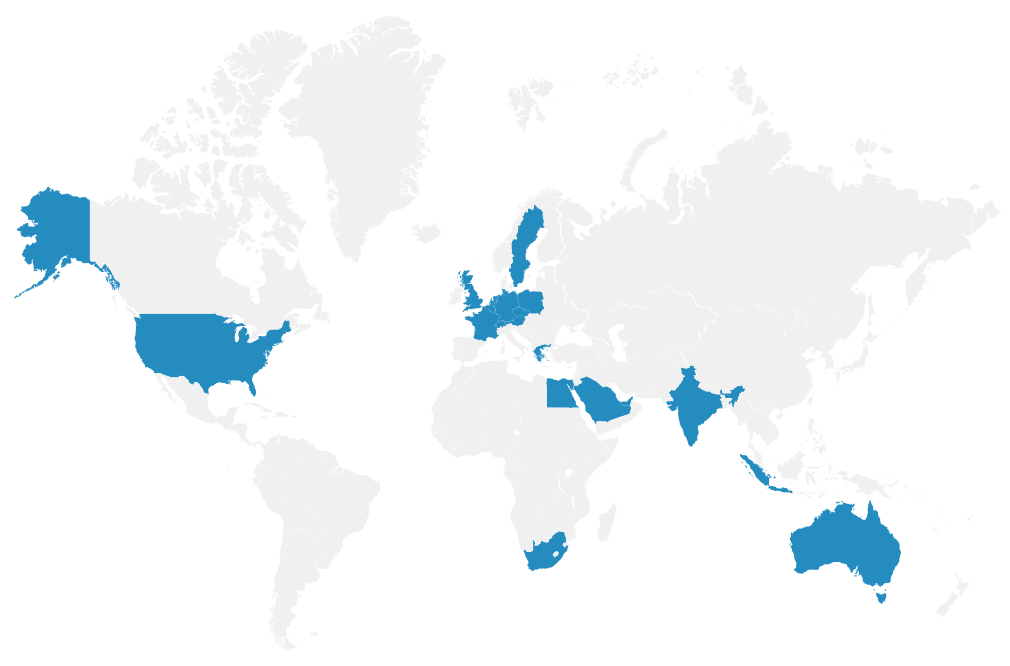
16+
Locations worldwide (Europe, EMEA, America, Asia)
30+
Countries in which we operate
120+
ERP and EPM employees
350+
satisfied customers
400+
Successfully implemented projects
Who this integration is a fit for
Finance teams running NetSuite alongside a German entity that reports through DATEV, and still moving accounting and payroll data by hand.
German entities on NetSuite
Companies running NetSuite with a German entity, or a subsidiary, that reports through DATEV.
Manual monthly exports
Teams still exporting G/L accounts, master data, or transactions to their tax advisor by hand every month.
Payroll in LuG or LODAS
Anyone processing payroll in DATEV Lohn & Gehalt (“LuG”, DATEV’s payroll module) or LODAS (DATEV’s alternative payroll system for larger or more complex payrolls) that needs to post into the NetSuite general ledger.
Multi-entity OneWorld setups
NetSuite OneWorld setups with several legal entities, each needing its own DATEV settings.
Legacy Tax or SuiteTax
Businesses on either of NetSuite’s two tax engines that want BU-Schlüssel (DATEV’s tax-treatment code, assigned to each transaction) resolved automatically instead of by hand.
Auditable review step
Finance teams that need a reviewable, auditable process before anything reaches their tax advisor, not just an email thread.
Companies that already rely on our portfolio


eUnify, thought through from a finance perspective
A native NetSuite application with German accounting and payroll compliance built in, not bolted on afterward.
Runs inside NetSuite
It runs as an application inside NetSuite itself, so there’s no separate portal or login for the finance team to manage.
One platform, both directions
Accounting export and payroll import run through one platform instead of two separate tools.
German compliance handled natively
BU-Schlüssel (tax-treatment codes), Automatikkonten (DATEV’s automatic reconciliation accounts), Kirchensteuer (church tax) and Solidaritätszuschlag (solidarity surcharge) withholding, and U1/U2 (employer reimbursement schemes for sick pay and maternity pay) are all handled natively instead of bolted on afterward.
Review before submission
Before any DATEV file goes out, you get an account-level summary of original, correction, and net debit/credit to check.
Per-entity configuration
Each legal entity keeps its own DATEV settings, account mappings, and booking configuration.
Automated payroll posting
Monthly or daily payroll runs post automatically, with gross-to-net validation before anything hits the ledger.
A trail auditors can follow
Full request history, status tracking, and employee-level detail give finance teams, and their auditors, a clear trail.
No third-party data silo
Accounting records stay in NetSuite. Only the compliant DATEV file goes to the tax advisor, so sensitive data never sits in a third-party silo.
Features
From a single accounting export to a fully automated close.
eUnify’s DATEV connector is built around two data flows, delivered as a phased rollout: most engagements start with accounting export, then add payroll import once the first close cycle is running smoothly.
Rechnungswesen: accounting export from NetSuite to DATEV
Export G/L accounts, customer and vendor master data, and transaction postings in DATEV EXTF format (DATEV’s standard data-exchange format), ready for the tax advisor with no manual reformatting. It covers three export types (Accounts, Customers & Vendors, Transactions), works with both Legacy Tax and SuiteTax, resolves BU-Schlüssel automatically, lets you post journal corrections before submission, supports multi-subsidiary configuration, and keeps a full request history.
Lohn & Gehalt: payroll import from DATEV to NetSuite
Automatically post monthly payroll journal entries (wages, social security, taxes, and net pay) into the NetSuite general ledger. It supports three booking modes (Department, Company, Employee), scheduled automated runs, gross-to-net validation, LuG and LODAS payroll formats, cost center to Department/Class/Location mapping, a workflow report email after every run, and an employee-level audit trail.
eUnify, manual export, or a typical DATEV connector? An honest decision guide
Most companies arrive at this decision from one of three starting points. It’s worth naming them plainly instead of just comparing feature checklists.
Rather keep manual export
Company profile
One legal entity, low transaction volume, no payroll import need.
Data volume & entities
Low volume, infrequent postings.
Compliance need
Manual review is still manageable.
Time to value
No implementation needed, but ongoing manual effort every month.
Payroll
Payroll booked manually, entity by entity.
Audit trail
Email-based history, harder to reconstruct.
Rather a typical connector
Company profile
Single-direction need (export only), limited compliance complexity.
Data volume & entities
Growing, but still a single entity or simple structure.
Compliance need
Basic EXTF export covers the requirement.
Time to value
Faster to set up, narrower scope.
Payroll
Usually not covered.
Audit trail
Varies by vendor; review step often missing.
Rather eUnify
Company profile
Multi-subsidiary NetSuite OneWorld, or payroll import required alongside export.
Data volume & entities
Multiple legal entities, each needing independent DATEV settings.
Compliance need
BU-Schlüssel, Automatikkonten, Kirchensteuer, Solidaritätszuschlag, U1/U2 all in scope.
Time to value
Native NetSuite app; days to first live export once mapping is confirmed.
Payroll
LuG and LODAS payroll import with gross-to-net validation.
Audit trail
Full request history, journal corrections, and employee-level trail, native to NetSuite.
In a joint discovery conversation, we assess your current export process and DATEV requirements without pre-committing you to a solution, and recommend the setup that fits your subsidiary structure, payroll needs, and compliance exposure.
We connect your relevant systems seamlessly
Cloudmaven connects eUnify to your existing system landscape: NetSuite OneWorld across multiple subsidiaries, DATEV Rechnungswesen and Lohn & Gehalt or LODAS on the tax advisor’s side, and any other Cloudmaven integrations you’re already running in NetSuite, such as Personio for HR data or Perk for travel and expense management.
Switching from an existing process
Typical starting points for a DATEV integration project differ quite a bit in effort and risk, so it’s worth setting expectations upfront:
Source process
Manual CSV/Excel export
Typical migration effort
Low to medium
What matters most
Mapping the existing chart of accounts and cost centers to DATEV format and BU-Schlüssel logic.
Source process
In-house or custom-built script
Typical migration effort
Medium
What matters most
Assessing the existing mapping logic and tax key rules before cutover, so nothing gets lost along the way.
Source process
Another third-party DATEV connector
Typical migration effort
Medium to high
What matters most
Migrating historical mapping configuration and running a parallel-run period before switching over.
Cloudmaven & eUnify
Our principle holds for integration projects too: we start the conversation with your finance processes and subsidiary structure, not with the connector. Cloudmaven already supports complex, growing organisations as a NetSuite implementation partner across Switzerland, Germany, and beyond.
eUnify was developed in-house specifically to close the gap between NetSuite and German accounting and payroll requirements: the same team that configures your NetSuite finance architecture also owns the DATEV connector, instead of handing you off to a third-party vendor.
Companies that already trust our portfolio

Our services
Requirement analysis and DATEV mapping design
Multi-subsidiary configuration, with per-entity DATEV and tax settings
BU-Schlüssel and tax key setup for Legacy Tax and SuiteTax
Payroll import configuration for LuG and LODAS
Tax advisor coordination and parallel-run testing
Ongoing support and monitoring
Our approach
Our approach is built on the Cloudmaven.ERP Methodology and its Target Operating Model (TOM) Framework.
What is the Cloudmaven Integration Rollout?
The implementation of eUnify’s DATEV connector follows a structured, phase-based approach: a requirements and mapping workshop, DATEV and tax key configuration, parallel-run testing against the existing export process, go-live, and a hypercare phase alongside the first live monthly close.
Implementation typically takes two to eight weeks, depending on how many subsidiaries are involved and whether payroll import is in scope alongside accounting export.
FAQs
What is eUnify’s NetSuite-DATEV integration?
eUnify is a native NetSuite application that automates two data flows with DATEV. It exports accounting data (G/L accounts, customer and vendor master data, transactions) in DATEV EXTF format, and it imports monthly payroll journal entries from DATEV back into the NetSuite general ledger.
Does it support both Legacy Tax and SuiteTax?
Yes. eUnify works with both Legacy Tax and SuiteTax configurations, including automatic BU-Schlüssel resolution for each.
Can we review the data before it’s submitted to DATEV?
Yes. Every request generates an account-level summary showing original, correction, and net debit/credit balances, so journal corrections can be checked and posted before the DATEV file is generated.
Which payroll systems are supported?
eUnify supports both LuG (DATEV Lohn & Gehalt) and LODAS payroll formats, with gross-to-net validation before any journal entry is posted into NetSuite.
What if we use a different DATEV product, like DATEV Unternehmen online, rather than classic Rechnungswesen?
The EXTF export format eUnify produces is DATEV’s standard exchange format and is accepted across DATEV’s Rechnungswesen product line, including DATEV Unternehmen online. If your tax advisor uses a different DATEV workflow, we confirm the exact fit during the discovery conversation before scoping the project.
How does the integration handle multiple subsidiaries?
Each legal entity gets its own independent DATEV settings, account mappings, and booking configuration. There’s no shared-config workaround needed, even across many entities.
Where does eUnify run, and is our data secure?
eUnify runs natively inside the NetSuite account. Accounting and payroll data stay in NetSuite, and only the compliant DATEV file leaves the system, so sensitive data never sits in a third-party integration silo. Access is role-based, encrypted, and fully auditable.
How long does implementation take?
Because eUnify is a pre-built NetSuite application rather than a custom-built interface, most companies go from kickoff to their first live DATEV export in a few weeks, not months. Your Cloudmaven consultant will scope exact timelines based on how many subsidiaries and payroll entities are involved.
Explore other tools for your business
If HR data also needs to flow into NetSuite, we support the Personio to NetSuite integration. For travel and expense management, the Perk platform integrates natively with NetSuite. For planning, budgeting, and consolidation we also offer Enterprise Performance Management (EPM), and AI process automation can take further manual effort out of your finance processes. All of these run on the same eUnify middleware underneath this connector.

Let our experts advise you without obligation