ERP Evaluation Checklist: The Complete 2026 Guide
Score vendors, validate fit, and choose the right system with a structured, evidence-based checklist.
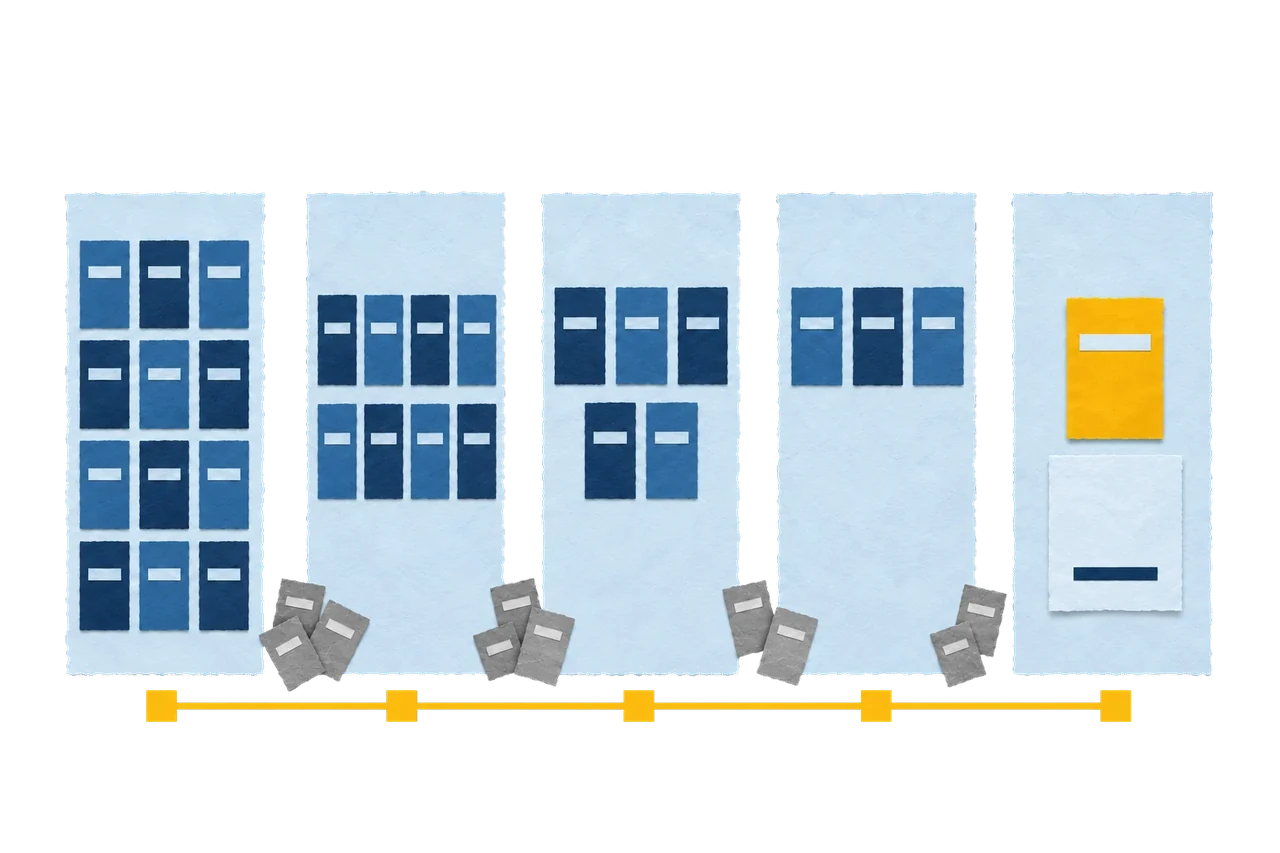
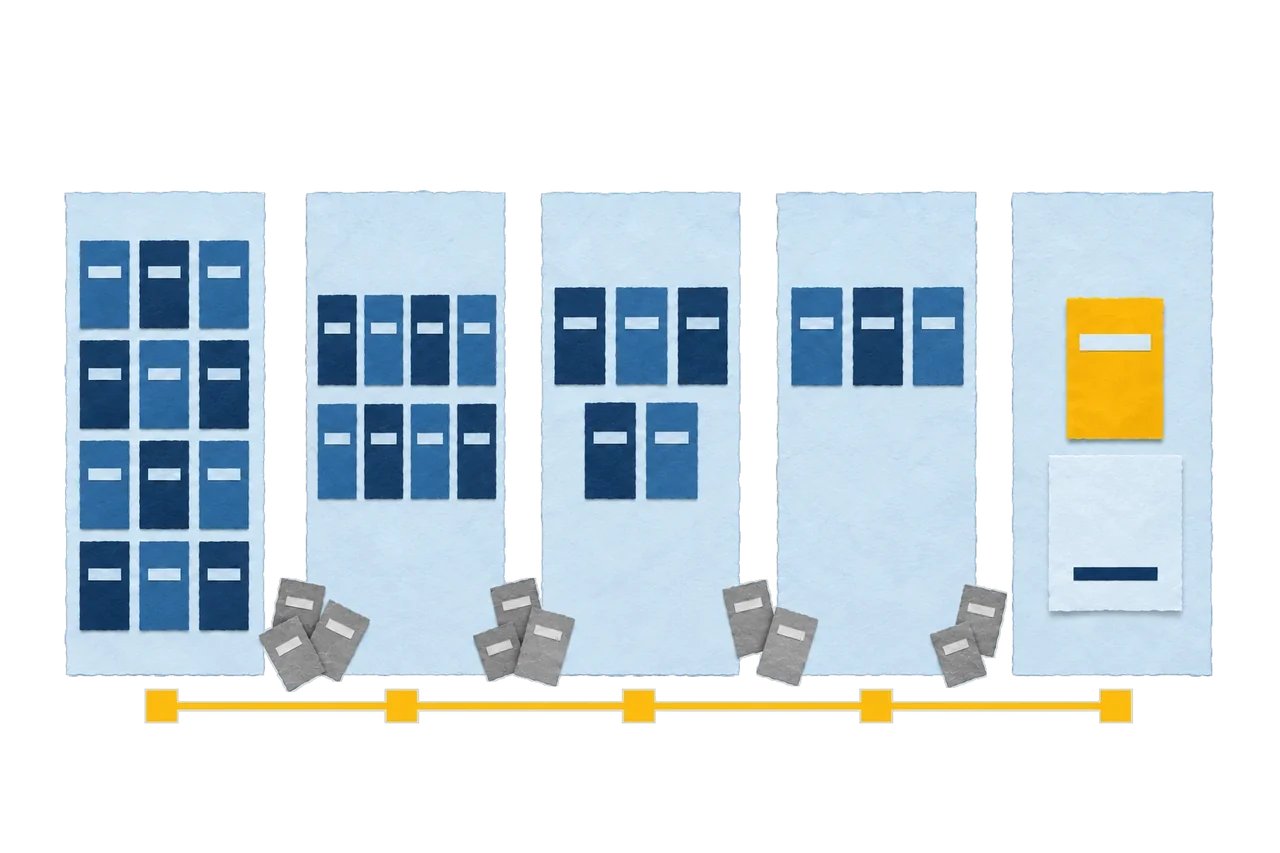
An ERP Evaluation Checklist turns a high-risk software purchase into a controlled, evidence-based decision. Enterprise Resource Planning (ERP) failures rarely stem from bad software. They stem from skipped diligence, vague requirements, and demos that dazzle instead of proving. This guide gives finance and operations leaders a structured framework to score vendors, validate fit, and protect long-term value. You will move from business goals to signed contract without the delays, rework, and cost overruns that sink most projects.
Why an ERP Evaluation Checklist Matters Before You Compare Vendors
An ERP Evaluation Checklist forces discipline into a decision that touches finance, supply chain, HR, and reporting at once. It replaces gut feelings with weighted criteria tied to business outcomes. Skip it, and the cost compounds fast.
The real cost of a wrong ERP decision
A wrong ERP choice drains capital long after go-live. Rework, stalled adoption, and standalone workarounds erode the return you modelled on paper. Most companies feel the pain in the first months after the rollout. The checklist front-loads the hard questions so surprises surface before contracts are signed, not after.
Direct cost overruns
From unplanned customisation and extended implementation timelines.
Operational disruption
When core processes break during a rushed cutover.
User rejection
When workflows feel tedious, cut your return on investment.
Replacement risk
When a rigid system cannot scale, forcing a second migration within a few years.
Feature-driven vs. value-driven evaluation
Value-driven evaluation beats feature-driven evaluation on every long-term metric. Feature lists reward the vendor with the longest spec sheet. Value alignment rewards the system that fits how your business actually runs.
Feature-driven buyers
Chase capability counts and shiny demos. The longest datasheet wins the room, even when it does not fit the work.
Value-driven buyers
Score each capability against a documented business process. The system that runs your revenue wins, not the one that lists it.
How to Evaluate an ERP System: The 5-Phase Process
An ERP system evaluation checklist works best inside a five-phase process that moves from internal clarity to signed contract. Each phase eliminates weak candidates and sharpens the shortlist. The sequence matters more than the speed.
01
Define business goals and requirements
02
Issue the RFP and build a shortlist
03
Run a first-cut weighted evaluation
04
Conduct detailed demos and references
05
Select and negotiate the contract
Each phase deserves its own rigor. The detail below turns the sequence into an operational playbook.
01
Define business goals and requirements
Requirements definition anchors the entire ERP selection process. Describe your business in terms of processes and volume, not a thousand-line feature wish list. Focus on what makes your operation unique.
Capture these inputs before contacting any vendor:
- Business problems the system must solve, such as disconnected systems or manual reconciliation.
- What your current system does well and must be preserved.
- Gaps the new system must close, ranked by business priority.
- Transaction volume, process complexity, and any exception handling that competitors mishandle.
Weak requirements produce weak proposals. This baseline is the reference every later score must map back to.
02
Issue the RFP and build a shortlist
The RFP (Request for Proposals) invites a select group of vendors to propose a fit against your documented needs. Smaller vendor pools with richer detail produce sharper responses. Aim for a dozen candidates or fewer.
A strong ERP RFP template carries five elements:
- A description of your business and its core processes.
- Current system strengths worth keeping.
- Current system weaknesses to fix.
- New capabilities, ranked by importance.
- Input from every stakeholder, so no department gets orphaned onto a standalone tool.
Verify features that vendors mark as “coming in a future release.” Bet the project on what references use today, not on a roadmap promise. A disciplined RFP narrows the field before demos consume your calendar.
03
First-cut evaluation with weighted scoring
First-cut evaluation ranks proposals against your criteria without direct vendor comparison yet. Weighted scoring keeps dozens of responses straight and documents the decision trail. Numbers cut through the blur.
Build the scoring model in four steps:
- List every RFP criterion in a spreadsheet.
- Assign each criterion a weight based on business impact.
- Have reviewers grade each proposal on a fixed scale, from one to five or one to ten.
- Multiply the score by weight and total for each vendor.
Watch for outliers. When two reviewers rate the same criterion far apart, one noticed something the other missed, and that conversation often changes the ranking. This phase produces a clean shortlist of three to five finalists.
04
Detailed evaluation, demos, and reference checks
Detailed evaluation verifies vendor claims through controlled demos and live reference calls. You control the demo, not the salesperson. Scripts keep every vendor on equal footing.
Manage this phase with tight rules:
- Send each finalist the same script of functions to demonstrate, in advance.
- Require your unique exception processes in the script, since standard flows look identical across systems.
- Push special features to the end, after the required script is covered.
- Ask demonstrators to use your own data where possible.
- Secure references, then ask them the hard questions: biggest surprises, and what they would do differently.
Do not get sold by personality. Judge whether the reference’s success is replicable in your environment. The winner of this phase enters negotiation from a position you understand fully.
05
Final selection and contract negotiation
Final selection names one primary candidate while keeping the runner-up warm. Negotiating leverage sits with you. Treat the vendor as a future partner, not an adversary. A fair deal keeps both sides invested in a working system.
Document every term across these areas:
- Licence, lease, or purchase of software and hardware.
- Implementation scope and definition of “done.”
- Initial and ongoing training costs.
- Maintenance and support levels.
- Data conversion and integration to other systems.
- Networking, security, and future customisation terms.
Review long-term costs carefully. Some vendors cap annual maintenance increases, and many do not, which skews your total cost of ownership if ignored. With terms locked, evaluation ends and delivery begins.
What Is a Checklist in ERP Evaluation?
A checklist in ERP evaluation is a structured scoring instrument that maps vendor capabilities to documented business requirements. It standardises judgment across reviewers and creates an audit trail for the decision. Used well, it sharpens comparison; used blindly, it hides real differences.
How checklists help and where generic checklists fail
Generic checklists fail because nearly every vendor answers “yes” to basic features. A list of common capabilities flattens meaningful differences into a wall of checkmarks. The signal drowns in noise.
Every box gets ticked
Standard features appear on every vendor’s list, so every box gets ticked.
Breadth mistaken for depth
Reviewers mistake breadth of checkmarks for depth of fit.
Your exceptions never appear
The criteria that actually separate systems—your exceptions—never make the list.
Checklists still earn their place. They enforce consistency and documentation. The fix is customisation, not abandonment.
Building a tailored checklist for your business
A tailored checklist reflects the processes that give your business its competitive edge. It weighs exceptions, not commodities. That focus is what makes an ERP requirements checklist decision-grade.
Build yours on three inputs:
Unique processes
The unique processes identified in your requirements phase.
Item weights
A weight for each item, from vital to nice-to-have.
Identical scale
A scoring scale applied identically to every vendor.
The 4 Pillars of ERP (Usability Evaluation Framework)
The four pillars of ERP usability are ease of use, ease of task completion, ease of administration, and ease of integration. Usability drives adoption, and adoption drives return. A powerful feature set means nothing if staff refuse to touch it.
The framework at a glance
01
Ease of use and navigation
How fast users find tools
02
Ease of task completion
How fast work gets done
03
Ease of administration
How cleanly IT governs the system
04
Ease of integration
How well it deploys and scales
Each pillar deserves a closer look before you score a single vendor.
Pillar 01
Ease of use and navigation
Navigation quality decides whether staff adopt or resist the system. A cluttered interface strips value from even the richest feature set. Users vote with their behaviour.
Signals to look for
- User-centric design and role-based interfaces.
- Universal search menus and contextual side panels.
- Personalised dashboards and accessible support channels.
The only reliable test is a hands-on trial. Demo the platform with your own team before you commit.
Pillar 02
Ease of task completion
Task completion measures how fast users convert tools into finished work. Finding a feature is half the battle; using it at speed is the other half. Efficiency lives here.
Signals to look for
- Configurable workflows and push notifications.
- PDF annotation and speech recognition.
- A mobile framework for work from anywhere.
Modern teams expect mobile access as a baseline. A system without it caps productivity before day one.
Pillar 03
Ease of administration
Administration ease determines whether governance drains IT or supports it. A well-built admin layer protects compliance and data governance without constant firefighting. Your IT team feels this daily.
Signals to look for
- A visual workflow engine and relational database.
- Artificial intelligence and machine learning support.
- Multi-entity support and unlimited user access.
Demand comprehensive support terms too. 24/7 online support and an active user community reduce your internal load.
Pillar 04
Ease of integration and scalability
Integration and scalability decide whether the system grows with you or blocks you. An ERP that fits today but cannot stretch forces a costly replacement tomorrow. Scale is a design property, not an add-on.
Signals to look for
- Modern APIs and open architecture.
- Import and export capabilities.
- Low-code and no-code frameworks.
- Global multi-site reach.
Each module must integrate as cleanly as the last, which links scalability straight to system components.
The Core Components of an ERP System
The core components of an ERP system are finance, supply chain, HR, CRM, and reporting, unified on one data model. Each module owns a business function while sharing a single source of truth. A cloud ERP like NetSuite binds these components into one accountable platform rather than a patchwork of disconnected tools.
Finance and accounting
Core function
General ledger, close, compliance.
Business value
Real-time financial visibility
Finance and accounting form the backbone of every ERP deployment. Revenue recognition alone can shift from a five-day manual task to full automation.
Supply chain and inventory
Core function
Procurement, stock, fulfilment.
Business value
Fewer stockouts, tighter cash flow
Supply chain and inventory management govern the flow of goods from procurement to fulfilment, tracking stock, orders, and warehousing in real time.
HR and payroll
Core function
Workforce data, pay runs.
Business value
Consolidated people operations
HR and payroll remove standalone tools that fracture your data. One record spans hiring, pay, and reporting.
CRM and sales
Core function
Pipeline, orders, customer data.
Business value
One customer record across teams
CRM (Customer Relationship Management) unifies pipelines, orders, and customer records inside the ERP. Handoffs stop leaking information between teams.
Reporting, analytics, and dashboards
Core function
Dashboards, forecasting.
Business value
Decisions without spreadsheet exports
Reporting and analytics convert transactional data into decision-grade insight. This is what turns an ERP from a system of record into a strategic tool.
Functional Fit: Assessing ERP Software Against Your Workflows
Functional fit measures how well ERP software supports your specific workflows, not how many features it lists. The best system is the one that matches your operation, not the one with the longest datasheet. Fit beats breadth every time.
Assess fit against your real processes:
- Test core functions: financials, inventory, production, procurement, reporting.
- Run real-world scenarios, not high-level walkthroughs.
- Judge how the system handles your exceptions, where systems truly differ.
The central tension in fit is configuration versus customisation, examined next.
Configuration vs. customisation
Configuration adapts the system through settings; customisation rewrites its code. The gap between them defines your long-term cost and upgrade path. One scales cleanly; the other accrues debt.
Configuration
How it works
Adjusts screens, workflows, and fields within the software.
Long-term impact
Survives upgrades. Low cost.
Customisation
How it works
Modifies underlying code to bend the software around an old habit.
Long-term impact
Breaks on updates. High maintenance.
Packaged ERP processes reflect “best practices.” Changing your procedure to fit the software usually beats bending the software to fit an old habit. That principle guides every fit decision.
Real-world scenario testing (not just demos)
Real-world scenario testing validates fit under your actual conditions. Scripted demos show polished happy paths; your business runs on exceptions. Test the edges, not the centre.
Feed each vendor the same demanding scenarios:
Out-of-stock orders
Orders for items not in inventory.
Kits and bundles
Sales of kits, packages, or sets.
Invoice matching
Your unique invoice matching process.
Scenario testing exposes gaps that no feature list reveals. Those gaps often decide the winner, and integration reveals the next layer of truth.
Integration and Data Migration Requirements
Integration and data migration determine whether the ERP joins your ecosystem or fractures it. ERP systems rarely operate alone; they must exchange data with payroll, CRM, and procurement. Clean data flow is the foundation of accurate reporting.
Two forces shape this stage: how systems connect, and how legacy data moves.
Interoperability with CRM, payroll, and procurement
Interoperability defines how cleanly the ERP exchanges data with surrounding systems. Seamless data flow creates one source of truth across the business. Poor integration forces manual re-entry and breaks reporting.
Evaluate connection quality on three points:
- System interoperability without extensive custom code.
- API integration depth for real-time exchange.
- Reporting consistency across multiple business units.
Cloudmaven addresses this directly through its own middleware, eUnify, and pre-built connectors such as NetSuite to Personio, NetSuite to Perk, and NetSuite to DATEV. Prebuilt integrations cut the custom work that delays go-lives.
Data quality, cleansing, and migration risk
Data migration risk grows with every unmanaged legacy record. Dirty data corrupts a new system on day one. Cleansing before migration is non-negotiable.
Control migration risk through disciplined preparation:
Audit
Audit whether current data can migrate cleanly.
Cleanse
Cleanse duplicates and errors before the move.
Map
Map legacy structures to the new schema in advance.
Underestimating migration is a top cause of delayed go-lives. Plan it as a workstream, not an afterthought, because scalability depends on a clean foundation.
Need a scored shortlist, not another vendor demo?
Cloudmaven runs ERP evaluation as a defined engagement: requirements, weighted criteria, scripted demos and commercial negotiation. The output is a decision record, not a recommendation slide.
Scalability, Flexibility, and Future-Readiness
Scalability and flexibility decide whether the ERP supports growth or caps it. A system that fits current volume but cannot absorb new users, sites, or models forces early replacement. Future-readiness is a purchase criterion, not a bonus.
Scalability spans two dimensions: structural capacity and technological adaptability.
Multi-entity and multi-site support
Multi-entity support handles multiple legal entities, currencies, and locations in one system. Growth through expansion or acquisition demands this capacity natively. Bolting it on later costs more than buying it now.
Confirm the platform scales across:
- Multiple entities and consolidated reporting.
- New locations and rising transaction volumes.
- Additional users without performance decay.
- Licensing and deployment models that flex with growth.
Multi-entity capability is where complex international deployments succeed or stall. Specialist implementation partners earn their fee precisely here.
AI, automation, and advanced analytics readiness
AI and automation readiness future-proofs the ERP against rising process demands. Configurability must support evolving workflows, not lock them. Tomorrow’s efficiency depends on today’s flexibility.
Prioritise platforms that support:
AI-driven analytics
Analytics and forecasting that run on live transactional data, not exported spreadsheets.
Process automation
Automation across finance and operations, not a single department pilot.
Configurable workflows
Workflows that adapt without code rewrites as the business changes.
A rigid system chosen today will become an expensive migration tomorrow. Flexibility protects the investment, and governance protects the data inside it.
Security, Compliance, and Governance
Security, compliance, and governance are non-negotiable evaluation criteria, especially in regulated industries. Data integrity and regulatory alignment cannot be retrofitted after go-live. Treat them as gating requirements.
Three areas demand hard answers before selection.
Data protection and access controls
Data protection governs how the ERP secures sensitive financial and operational records. Access controls define who touches what. Weak controls expose the business to breach and fraud.
Probe each vendor on
- Encryption and data protection mechanisms.
- Role-based access and permission granularity.
- Audit trails for every sensitive transaction.
Security gaps surface after implementation when they are most expensive to fix. Ask now, in the RFP, not later.
Audit readiness and internal controls
Audit readiness measures how well the system supports internal controls and external audits. Strong controls enforce accountability and traceability. Auditors expect evidence, not assurances.
Confirm the platform delivers
- Support for internal control frameworks.
- Audit-ready logs and reporting.
- Clear ownership over data integrity.
Governance planning assigns accountability for decisions, milestones, and data. That structure reduces risk long before an auditor arrives.
GDPR and EU compliance considerations
GDPR compliance is mandatory for any ERP processing EU personal data. The regulation governs data residency, consent, and the right to erasure.
4%
Non-compliance carries fines up to 4% of global annual revenue. That figure alone moves GDPR from a legal review item to a gating criterion in the RFP.
For German and EU operations, verify:
Data residency
Where data physically resides, since residency shapes compliance.
DATEV compatibility
DATEV compatibility for German accounting and tax standards.
Subject requests
Documented processes for data subject requests.
DATEV alignment is the detail most global vendors miss in the German market. That gap is precisely where a locally fluent partner protects you, and cost is the next lens to apply.
Total Cost of Ownership and ROI
Total Cost of Ownership (TCO) and Return on Investment (ROI) frame the true economics of an ERP decision. Licence prices are a fraction of lifetime cost. A cheap entry point can hide the most expensive system.
Cost and value must be weighed together, across the full lifecycle.
Licensing, implementation, and hidden long-term costs
Total cost of ownership sums up every expense across the system’s life, not just the licence. Implementation, training, and support often exceed the software fee. Hidden costs decide the real winner.
Model the full cost stack:
Licensing
Licensing or subscription fees, including user, module and consumption charges.
Services
Implementation and professional services that turn the licence into a working system.
Migration
Data migration and integration work that is almost always underestimated.
Ongoing
Support, upgrades, and internal resources across the full system life.
Some SaaS vendors start low and raise subscription rates sharply after a few years. Get long-term pricing in writing before you sign.
Modelling ROI beyond direct savings
ROI captures value beyond direct cost savings. Improved performance, faster service, and workforce productivity all count. A narrow ROI model undersells the right system.
Direct cost reduction
Measured against the running cost of the current system.
75%
Productivity gains from automation, such as a 75% cut in administration.
Service and performance
Improvements that lift revenue, not only those that cut cost.
Balance cost against value, since a lower price paired with heavy customisation erodes ROI. The right economics still depend on the vendor behind the software.
Evaluating the ERP Vendor and Implementation Partner
Vendor and partner evaluation weigh the company and the implementation team, not just the code. ERP success depends as much on the partner as the platform. The right software with the wrong partner still fails.
Three factors separate strong partners from risky ones.
Vendor stability, support tiers, and response times
Vendor stability signals whether the provider will support you for the system’s full life. Support quality shapes your daily experience post-go-live. Slow response times compound every operational problem.
Interrogate each vendor on
- Support plans, pricing, and after-hours coverage.
- Response times and ease of contact.
- Years in business and financial stability.
A vendor you cannot reach in a crisis is a liability. Test responsiveness during evaluation, when answers are still free.
Partner certifications, methodology, and track record
Partner certifications prove the implementation team can deliver the exact modules you need. Methodology and track record predict execution quality. Certified experience de-risks the build.
Verify the partners
- Certifications and formal accreditation.
- Experience implementing your specific modules.
- Track records with companies of your size and industry.
An experienced implementation partner aligns configuration to your operational strategy instead of installing generic defaults.
Cloudmaven operates as a Certified Oracle NetSuite Solution Provider, selling and implementing NetSuite as an accountable, end-to-end partner. That single-vendor accountability removes the finger-pointing that plagues split engagements.
Reference checks and site visits
Reference checks validate partner claims against real customer outcomes. Site visits reveal whether promised benefits materialised. Evidence beats testimonials.
Run references with rigor:
- Confirm that the reference customer implemented the software and realised the benefits.
- Agree in advance on what you will see and who you will meet.
- Ask the hard questions about surprises and lessons learned.
Judge whether their success transfers to your environment. Sometimes the honest answer is that you need outside help to run this process well.
When to Bring in an ERP Evaluation Partner
An ERP evaluation partner is an independent advisor who runs your selection process without a stake in the outcome. External expertise shortens the cycle and reduces the risk of a costly mismatch. The question is timing, not necessity.
Bringing in the right advisor pays off in specific situations.
What an ERP evaluation partner does
An evaluation partner structures the entire selection, from goals to vendor fit. The advisor builds frameworks, defines success metrics, and pressure-tests each option strategically. The role is guidance, not sales.
A dedicated ERP evaluation partner delivers concrete work:
Defining clear business objectives and success metrics.
Building evaluation frameworks and weighted checklists.
Assessing vendors’ fit on strategic, operational, and financial grounds.
Mitigating adoption, integration, and scalability risk before contracts are signed.
As a CFO advisor to SMEs across the EMEA region, Cloudmaven brings this frame to companies like Breitling, Bitpanda, and Austrian Airlines. Strategy-first advisory keeps the decision anchored to value, not features.
Signs your team needs external support
External support becomes necessary when internal ERP expertise runs thin. Complexity, scale, and stakes each raise the case for an advisor. Recognise the signals early.
Consider a partner when
- Your team lacks hands-on ERP selection experience.
- The deployment spans multiple entities or countries.
- Internal stakeholders cannot align priorities.
- A prior ERP project was underdelivered or failed.
Complex, multi-entity, and international deployments are exactly where specialist advisors prevent expensive mistakes. Independence is the trait that makes their counsel trustworthy.
Independent advisory vs. vendor-tied consultants
Independent advisory serves your interests; vendor-tied consultants serve the sale. The distinction shapes every recommendation you receive. Check affiliations before you trust the advice.
Independent advisor
Incentive
Your outcome.
Risk to you
Minimal bias
Vendor-tied consultant
Incentive
Their licence sale.
Risk to you
Skewed recommendation
Verify that any advisor is truly independent, not quietly aligned with one provider. Neutral counsel is worth more than a free demo. With the right partner engaged, adoption becomes the final hurdle.
User Adoption and Change Management
User adoption determines whether the ERP delivers value or gathers dust. The most feature-rich system fails if teams resist it. Adoption is where ROI is won or lost.
Change management turns a technical rollout into an organisational shift.
Training, support, and organisational readiness
Organisational readiness measures whether your teams can absorb new processes without disruption. Training and vendor support carry users through the learning curve. Readiness planning prevents productivity collapse at go-live.
A structured implementation process supports adoption through defined phases:
Intuitive workflows for finance and operations teams.
Extensive vendor training and support during the transition.
Change management that handles process shifts without halting work.
Clear communication to keep employees informed throughout.
Leaders who prioritise adoption see faster ROI and stronger operational alignment. That readiness feeds directly into the checklist that operationalises this entire guide.
The Complete ERP Evaluation Checklist
The complete ERP Evaluation Checklist consolidates every decision point into four question sets. It spans requirements, vendors, systems, and rollouts. Work through it in order, and no critical factor slips through.
Group your questions across four phases.
01
Requirements & goals questions
Requirements questions define what success looks like before any vendor enters. They anchor the ERP evaluation criteria to business outcomes. Clarity here prevents drifting later.
Ask your team
- What are our goals for the system, and which challenges must it solve?
- What are the goals of other departments?
- Does any single system meet our top priorities?
- How much customisation are we willing to fund?
- What is the timeframe and budget?
02
Vendor & partner questions
Vendor questions expose the company and team behind the software. They cover support, experience, and references. These answers separate reliable partners from risks.
Ask each vendor
- What support plans, pricing, and after-hours coverage do you offer?
- What is your response time and ease of contact?
- Have you implemented our industry and our exact modules?
- How long have you been operating, and can you provide references?
- What is your implementation plan?
03
System & technical questions
System questions test capability, cost, and fit. They span integration, scalability, and total cost of ownership. Technical rigor here protects long-term value.
Ask about the system
- Which systems must it integrate with?
- What are the initial, maintenance, and ongoing costs?
- Have we calculated TCO and assessed ROI?
- Cloud versus on premises: Which model fits?
- Does it scale, suit our industry, and support mobile access?
- Which modules will we use now versus later?
04
Implementation & rollout questions
Rollout questions govern execution and adoption. They cover leadership, strategy, and measurement. Planning here turns selection into successful delivery.
Ask before rollout
- Do we have executive support and commitment?
- Have we set clear project goals and involved stakeholders?
- Who leads the implementation, and which strategy will we use?
- How will we communicate with and train employees?
- How will we measure system success?
ERP Evaluation Checklist FAQs
The most common ERP Evaluation Checklist questions cluster around process, pillars, components, and timing. Short, direct answers resolve them below. Each reflects the framework detailed above.
How do you evaluate an ERP system?
Evaluate an ERP system through five phases: define requirements, issue an RFP, run a first-cut weighted scoring, conduct detailed demos and reference checks, then select and negotiate the contract.
What is a checklist for evaluation?
A checklist in ERP evaluation is a weighted scoring instrument that maps vendor capabilities to your documented business requirements, standardising judgment and creating an audit trail.
What are the 4 pillars of ERP usability?
The four pillars of ERP usability are ease of use and navigation, ease of task completion, ease of administration, and ease of integration and scalability.
What are the 5 components of ERP?
The five core components are finance and accounting, supply chain and inventory, HR and payroll, CRM and sales, and reporting and analytics, unified on one data model.
How long does the ERP evaluation process take?
The timeline depends on business complexity and stakeholder alignment, but a structured five-phase process shortens it by eliminating rework and repeated demos.
How do GDPR requirements affect ERP selection in Germany?
GDPR governs data residency, consent, and erasure for EU data. German selection also requires DATEV compatibility for local accounting and tax compliance.
An ERP Evaluation Checklist is the difference between a system that drives growth and one that drains it. The framework here moves you from vague ambition to a documented, defensible choice: clear requirements, weighted scoring, validated fit, and a partner you trust. Discipline protects value, drives adoption, and supports growth for years. Cloudmaven brings this structure to every engagement as a CFO advisor and Certified Oracle NetSuite Solution Provider, turning ERP selection from a risky leap into a strategic decision. Start your evaluation with the questions above and choose from evidence.
Start your evaluation with evidence, not a demo
Bring your current pain points, growth plan and compliance obligations. We will pressure-test your criteria, build a weighted scorecard and keep every vendor on equal footing before the first salesperson is in the room.